
For a while there, mobile apps were such a common solution that the phrase “there’s an app for that” became a cliche. But while mobile apps aren’t going anywhere, there are signs that app fatigue has set in. One recent study found that 80% of smartphone users have downloaded an app before only because they felt obligated to and 72% were annoyed about it. But while there’s still a place for native mobile apps for many businesses, there’s also an attractive alternative that offers some of the same features, without requiring a download: RCS (Rich Communication Services).
Now businesses are faced with a choice: should you build a native app for your business, should you try RCS messages, or should you use a combination of both?
Why Brands Compare RCS and Native Mobile Apps
While SMS (Short Message Service) has been an option for a while now, the features available with SMS messaging have some limitations that made many businesses feel a native mobile app was necessary. In comparison, RCS messaging offers features that bring the texting experience closer to the functionality and experience within a mobile app, such as:
- Better security – All RCS messages are encrypted, making it an option for secure messaging needs, such as for highly regulated brands like healthcare and finance.
- Branded experiences – With RCS, brands must be approved for verified sender status and are able to create a more branded communication experience by loading business details to your profile and using your brand colors. That sets you apart from scammers and helps inspire trust in recipients.
- Scheduling features – RCS chips can provide interactivity with a user’s other mobile apps, including their calendar. That means when you send an RCS message that includes an appointment reminder or event details, users can add it to their calendar with a click.
- Map features – RCS chips can also connect with a user’s preferred map app, so they can pull up directions to any address you include right on their phone.
- Shopping features – RCS call-to-action buttons can also interact directly with your ecommerce website, making it easy for recipients to add an item to their cart or start the checkout process within their mobile inbox.
- Personalization – You can use RCS to send personalized content based on the data you have about each user on your list, helping to improve engagement and results.
- Interactive features – Features like suggested replies make it extremely easy for people to take action in response to your messages, which can further increase engagement and help you build relationships with customers.
- Robust support features – You can use features like interactive flows and rich media to enhance support conversations in RCS, such as adding quick replies for common issues to make interactions easier for customers, and including media like video tutorials to provide better instructional content.
What RCS Messaging Is
RCS is a messaging protocol that has become widely adopted over the past few years. For brands, it provides powerful trust and safety features like branded profiles, to clearly set your messages apart from scams and spam, as well as encryption. It also allows for features like rich media (high-resolution images, videos, GIFs, PDFs, and audio files), carousels, CTA (call to action) buttons, suggested replies, and read receipts. And for the rare cases when a consumer can’t receive RCS yet, SMS fallback ensures they can still receive your messages.
What a Native Mobile App Is
A native mobile app is an application designed for use on a specific mobile operating system (OS). In most cases, that means Android and iOS, since they have the lion’s share of the mobile market. Native mobile apps are built using the programming tools particular to that system and because they’re purpose built for that OS, they work faster and more seamlessly on that platform.
Why RCS and Native Mobile Apps Solve Different Problems
Native mobile apps provide a contained environment built to your brand specifications. You can design your app to include the functionality that best serves your customers and business needs. That could include building complex workflows for uses like product research and purchases, customer service journeys, and loyalty programs. They often involve user accounts and log-ins, which allows for more personalization within the app and helps with maintaining security for use cases like financial transactions.
Mobile apps have more potential for complexity, but they also require more buy-in from your users. People have to choose to download the app, and can choose whether to enable notifications — meaning you could lose their attention once the app is installed and struggle to get it back.
RCS, by comparison, requires no downloads. Other than opting into your list, most customers will be able to receive your RCS messages without having to take any additional actions. As long as they’re opted in, they’ll receive notifications for each new message (assuming they have notifications turned on for text messages). That helps you keep their attention more easily, even if the overall experience is less specific to your brand and has more limited functionality than a native mobile app can offer.
What RCS Messaging Does Best
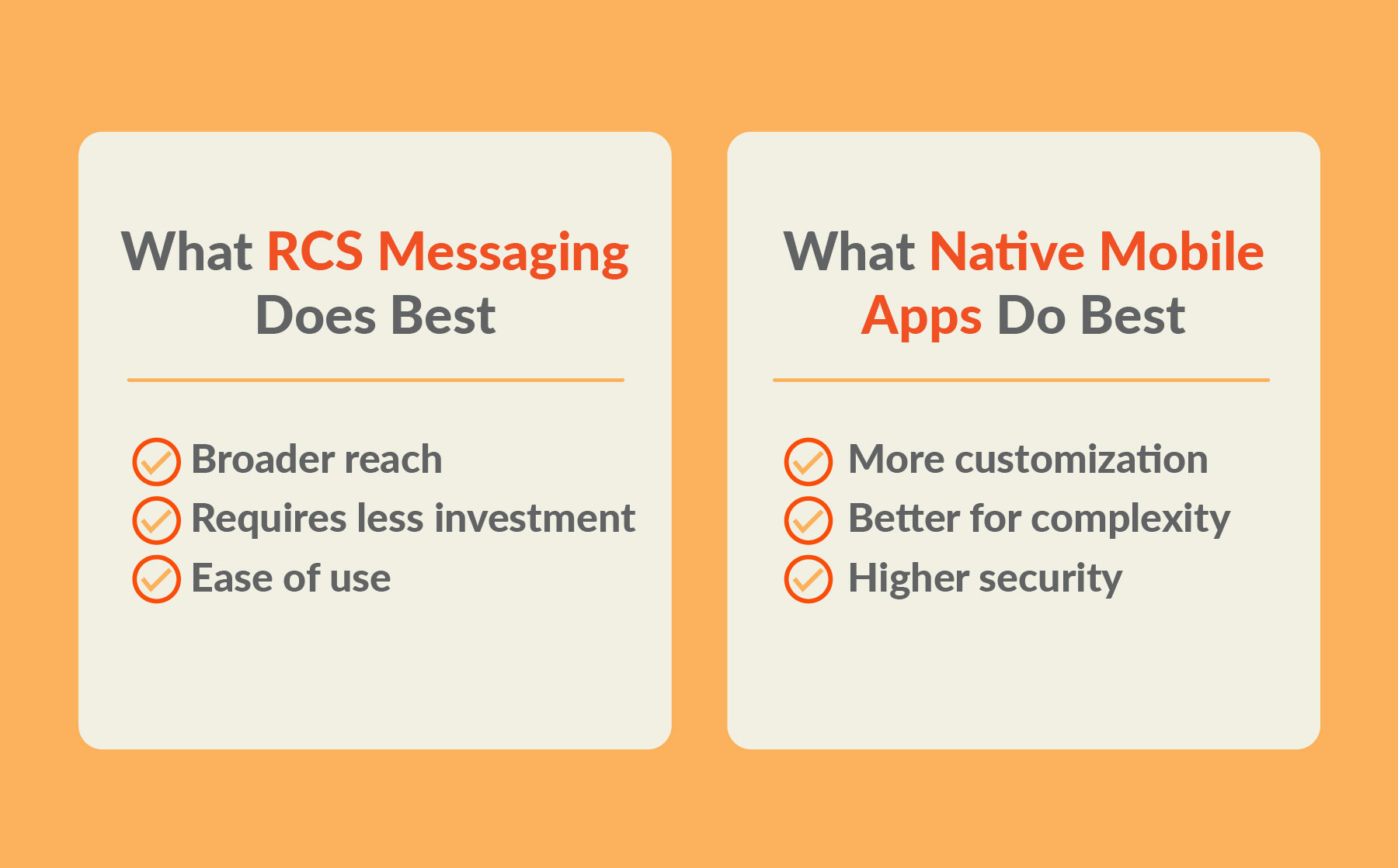
RCS messaging has some different strengths than native mobile apps. Some of the ways it comes out ahead are:
- Broader reach – RCS messaging works on most mobile devices automatically, so consumers can use it without any effort on their part, whereas mobile apps require a download.
- Requires less investment – RCS is much more affordable and easier to get started with than building a mobile app, you simply need to invest in a text messaging platform and get verified.
- Ease of use – Writing and sending RCS messages is easy, as is receiving and interacting with them on the recipient’s side.
What Native Mobile Apps Do Best
Native mobile apps can provide some benefits RCS lacks, like:
- More customization – While RCS offers a lot of features, native mobile apps can be designed more specifically to your specifications, meaning you have the potential to include more advanced functionality.
- Better for complexity – Mobile apps can be set up to handle more complicated workflows and customer journeys than RCS, making them the better choice for businesses that have more complex needs on mobile.
- Higher security – While RCS messages can be encrypted, native mobile apps are a more contained environment that can offer even higher levels of security. For certain use cases, like a bank that wants to offer mobile deposits or a healthcare company that wants to provide telehealth options, that’s important.
RCS vs Native Mobile Apps: Comparing the Key Business Factors
If you’re not sure whether RCS or a native mobile app is the best option for you right now, here’s how they stack up against each other in a few main categories:
Reach and Accessibility
When Apple started supporting RCS this year, it significantly expanded the reach of RCS accessibility. Android already supported iOS, and the two operating systems cover around 98% of the entire smartphone market.
With native mobile apps, you have to build a distinct app for each OS, which means more work to achieve accessibility across both of the main markets. And even then, people have to find and choose to download your mobile app — a big ask when people have a lot of other apps competing for their attention.
User Friction and Adoption
RCS now works by default for many smartphone users, meaning they don’t have to do anything special to receive messages from brands that have RCS features. While RCS access isn’t quite universal, it’s already very common and only becoming more so.
With native mobile apps, app fatigue works against you. 45% of people say they’ll only download an app if they really need it, and 18% will refuse to if there’s an alternative they can use in their browser.
Engagement and Visibility
Text messages have a 98% open rate, meaning there’s a high likelihood your RCS messages will be seen. Using RCS features can also lead to high engagement, since they make it easier for consumers to take the next action — whether that’s clicking on a suggested response, pulling up an address on their map, adding an item to their shopping cart, or watching a video that’s included in the messages.
Mobile apps have the potential for high engagement, but competition is fierce. 64% of people said they have between 10 and 50 apps on their phone, but 46% only engage with 5 to 10 of those per day. Convincing people to download your app is already hard, but getting them to use it regularly is even more of an uphill battle. And since they can choose to turn notifications off, your tools for driving attention back to the app are limited.
Development and Maintenance Effort
Sending RCS messages requires investing in a text messaging or SMS platform, developing a text messaging marketing strategy, and monitoring your analytics to determine how to improve results over time.
What you’ll spend on building and maintaining a native mobile app depends on a lot of the complexity of what you want it to do. According to Business of Apps, mobile app development costs for businesses often run in the tens to hundreds of thousands of dollars, and the cost of hiring a developer for ongoing maintenance adds an additional salary cost on top of that.
Speed to Launch
Getting set up on a platform for enterprise text messaging is quick and easy in most cases. Getting started with RCS takes a bit longer, because you need to apply to become a verified sender and wait for approval, which generally takes 8-10 weeks.
Meanwhile, Business of Apps puts the typical time to develop a new mobile app at 2-4 months for something simple, and 9 months to a year for something more complex.
Long-term Value
With RCS, since upfront costs and time to launch are minimal, gaining value from your investment is comparatively easy. If you can get consumers to sign up and engage with your messages (the harder part, but doable if you follow best practices), the long-term value can be significant.
Long-term value for a native mobile app can be even tricky to gauge effectively. An app that makes it easier for a customer to make purchases on their phone can absolutely help increase sales and profits — that part’s comparatively easy to track. But many of the best reasons for building a business mobile app have to do with improving ease of use and the customer experience. Intuitive mobile navigation can improve convenience, which can boost customer satisfaction. And if your app provides easier customer support experiences, engaging marketing messages, and better personalization, that can all add up to improved loyalty.

When RCS Is the Better Choice for Your Brand
RCS is the better choice for your brand if you want to start communicating with your audience on mobile sooner rather than later, don’t want to spend too much to get your mobile marketing or support program off the ground, and are satisfied with the features RCS makes available. You can still provide rich media, drive engagement with suggested replies and CTA buttons, and send messages that interact with smartphone tools like map and calendar apps.
When a Native Mobile App Makes More Sense
A native mobile app is a good idea for when your needs are more complex. If you want more control over the features and functionality you offer users on mobile, an app lets you design everything to your specifications. If you need a higher level of security, such as for financial transactions or healthcare information, a mobile app is likely to be the better choice.
How RCS and Native Mobile Apps Can Work Together
RCS and native mobile apps each offer different benefits. You don’t necessarily have to choose one or the other. RCS can be a powerful way to help promote your mobile app and drive new downloads, while your mobile app can include CTAs to drive sign-ups to your RCS list. Even if people choose not to turn on notifications for your app, if they opt-in to RCS you can still keep the lines of communication open and stay top of mind.
How to Choose the Right Channel for Your Use Case
To choose which option is best for your needs, consider:
- Do I want to start reaching consumers sooner rather than later? Choose: RCS
- Do I need to include complex features and workflows? Choose: A native mobile app
- Do I want to keep costs low? Choose: RCS
- Do I need a higher level of security than encryption? Choose: A native mobile app
- Do I want the widest reach possible, with a low barrier to entry for consumers? Choose: RCS
RCS vs Native Mobile Apps: Final Verdict for Brands
There’s not one right answer to the choice of RCS vs native mobile apps. It depends on what you’re looking for in a mobile experience for your brand, and for many brands offering both will make sense.
If you know you want to get started with RCS right away, set up a demo of TrueDialog to see everything RCS messaging can offer.
FAQs
-
What is the difference between RCS messaging and a native mobile app?
RCS is a messaging channel that shows up right in a user’s mobile inbox, much like SMS, but with more rich media and interactive features. A native mobile app is an application designed for a specific mobile operating system that has the potential for more functionality and security.
-
Is RCS more cost-effective than developing and maintaining a native app?
Yes, sending branded RCS messages only requires investing in a mass text messaging platform and the work required to develop and execute on a text messaging marketing plan. A native app requires hiring a developer to build an application (or multiple applications for each OS) and maintain it over time, which costs more.
-
Do customers need to download anything to use RCS?
No. Most consumers have access to RCS messages already on their mobile devices.
-
Why might RCS get more attention than app push notifications?
RCS shows up right in a consumer’s mobile inbox, just like any text message. A mobile app’s push notifications require the user to both download the app, and then choose to receive notifications, which are easy to turn off.