


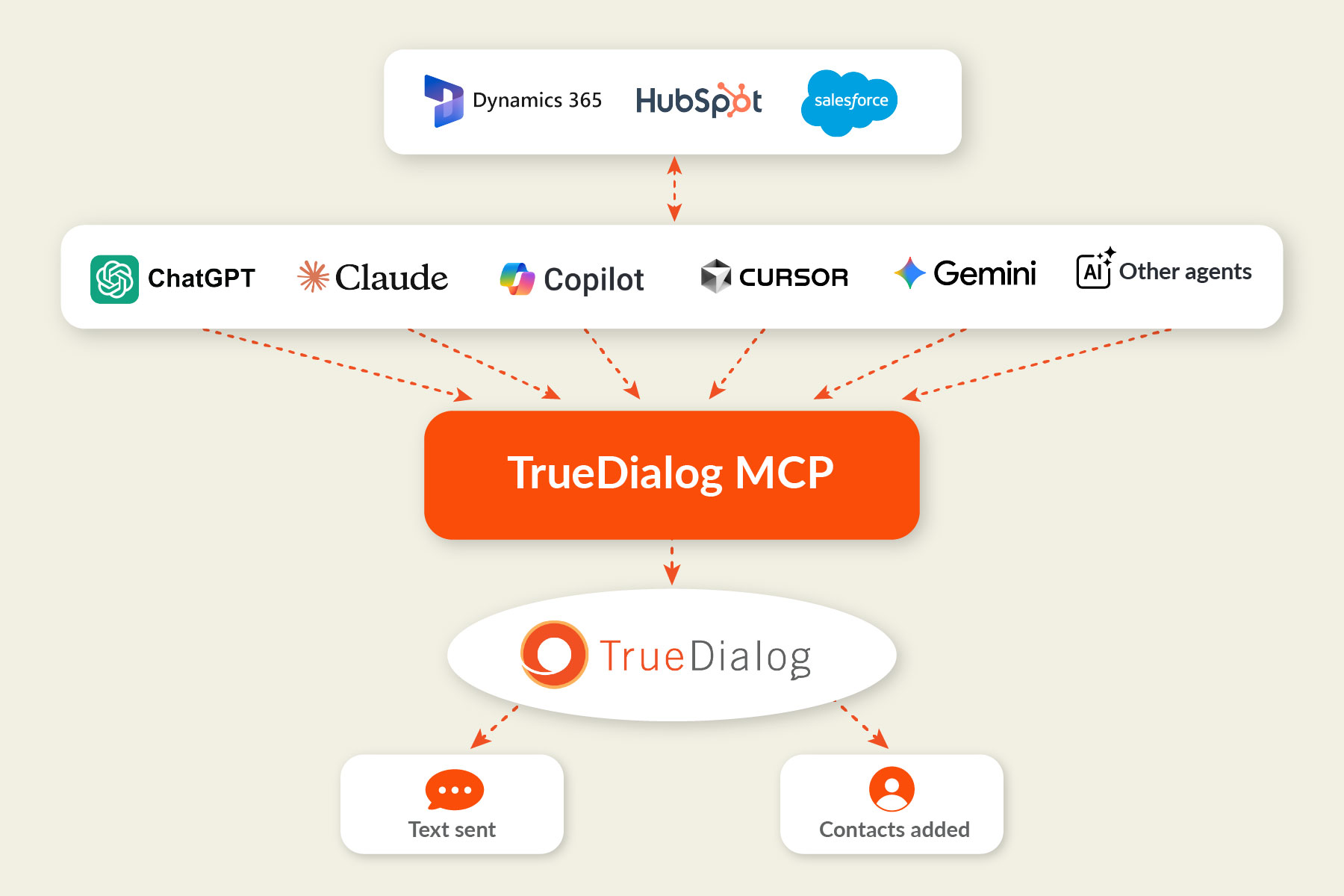
Model Context Protocol (MCP) is an open standard for linking AI tools to other software. Our MCP connects your AI assistants and agents to your TrueDialog account so they can send messages and manage contacts.
TrueDialog MCP
Send Texts and Manage Contacts from Your AI Assistants
Our MCP connects your TrueDialog account with ChatGPT, Copilot, Claude, other AI assistants, and the AI agents your team builds, so you can send texts and manage contacts without switching apps. Enjoy the convenience of AI-powered messaging, backed by the reliable infrastructure, 10DLC registration, and opt-out protections that thousands of TrueDialog customers already trust.
Try It with the AI Agent You Already Use
Connect your AI assistant and sign in with your TrueDialog login to easily draft and deliver messages in the same chat.
Connect to TrueDialog
Add our MCP to your preferred AI assistant, then sign in with your TrueDialog login. That’s it! Now you can send texts and manage contacts without switching apps. Find quick setup steps for ChatGPT, Claude, and more at tdmcp.com.

Text One Contact Or a Whole List
Ask your assistant to send an SMS to a single number or hundreds of contacts, directly from any short code or long code on your account.

Check Your Message Before It Goes Out
Ask your assistant to run a test send first, so you can see exactly what your message will look like before it reaches real people.

Manage Contacts with Plain Language
Search, add, and update contacts with simple prompts. Get help cleaning up your data and importing contact lists into TrueDialog.

Count On Compliance-Friendly Sends
Your agent works with TrueDialog’s built-in compliance to identify issues, honor opt-outs, and send from brand-registered numbers.

Now with RCS
Send RCS Messages from Your AI Assistant
Describe the message you have in mind (or pick a design you’ve already saved), and our MCP builds the RCS experience for you. Send a test to your phone to see exactly what your customers will: your brand name, logo, and verified checkmark at the top, plus buttons they can tap.
- Start with a saved design or a simple prompt: Use an RCS design from your TrueDialog account, or describe a new card with a title, message, and buttons.
- Add buttons contacts can tap: Give each card up to four buttons to reply, open a link, place a call, or get directions.
- Preview it on your phone first: Test sends so you can review every detail before the card reaches your contacts.

Bring Texting to Your Team’s AI Tools
Your team already drafts work in an AI conversation. With the TrueDialog MCP, your AI assistants (and the agents your team builds) can send texts as soon as that work is ready.

For your team
Draft a message in ChatGPT or Claude and send it from the same conversation, without learning a new app.

For your developers
Give your agents ready-made tools for texting and contact management, without building custom integrations.

For your business
Rest assured that your messages are still backed by TrueDialog’s built-in compliance, deliverability, and support.
For your team
Draft a message in ChatGPT or Claude and send it from the same conversation, without learning a new app.
For your developers
Give your agents ready-made tools for texting and contact management, without building custom integrations.
For your business
Rest assured that your messages are still backed by TrueDialog’s built-in compliance, deliverability, and support.
Ask for What You Need (in Plain Language)
No need to worry about mastering new tools or commands. Put the TrueDialog MCP to work with quick and simple prompts.

“Text these 25 numbers a reminder that tomorrow’s orientation starts at 10 a.m.”
“Find Jordan Lee’s contact record and update her mobile number.”
“What numbers are available to send SMS from?”
“Text these 25 numbers a reminder that tomorrow’s orientation starts at 10 a.m.”
“Find Jordan Lee’s contact record and update her mobile number.”
“What numbers are available to send SMS from?”
“Do a dry run of this message to my field team before you send it.”
“Add this contact to my account and send them a promotion for a 10% discount.”
“Do a dry run of this message to my field team before you send it.”
“Add this contact to my account and send them a promotion for a 10% discount.”
For Developers
Build Texting into Your Apps’ AI Agents
Give the agents in your apps the power of text, and they will determine next steps, use TrueDialog tools, and check their work.

Order and Account Alerts
When an order ships or an account needs attention, your agent can text the customer right away (no manual send required).

Lead Response
When a new form submission comes in, your agent can find the contact, choose the correct sending number, and follow up in minutes.

Schedule Updates
Appointment cancellation? Last-minute event change? Your agent can find out who’s affected and keep them in the loop.
Order and Account Alerts
When an order ships or an account needs attention, your agent can text the customer right away (no manual send required).
Lead Response
When a new form submission comes in, your agent can find the contact, choose the correct sending number, and follow up in minutes.
Schedule Updates
Appointment cancellation? Last-minute event change? Your agent can find out who’s affected and keep them in the loop.
Built for Production
- Start runs from any event: Kick off an agent with a schedule, webhook, form submission, or click of a button.
- Set the limits: Grant agents access only to the tools they need, including read-only permissions or the ability to send messages.
- See every step: Your app logs everything your agent did (and why) so you can track updates or take action.
- Do more with the API: Use TrueDialog API callbacks to send customer replies to your app, so your agent can respond with the reply as context.
- Add the full API when you need it: Get started with the MCP, then use our API to expand. (No need to change providers as you scale.)

Backed By the Full TrueDialog Platform
Our MCP gives you the infrastructure, compliance, and support thousands of TrueDialog customers trust, right inside your preferred AI assistant.

Owned Messaging Infrastructure
Your messages don’t pass through third-party aggregators. They run on infrastructure we own, built for reliable delivery at enterprise scale.

Built-In Compliance
Every text sends from your brand-registered 10DLC or short code number and honors contact opt-outs.

Enterprise-Grade Security
TrueDialog meets SOC 2 Type II, TX-RAMP, and ISO 9001 certification standards.
Owned Messaging Infrastructure
Your messages don’t pass through third-party aggregators. They run on infrastructure we own, built for reliable delivery at enterprise scale.
Built-In Compliance
Every text sends from your brand-registered 10DLC or short code number and honors contact opt-outs.
Enterprise-Grade Security
TrueDialog meets SOC 2 Type II, TX-RAMP, and ISO 9001 certification standards.

White Glove Support
100% U.S.-based customer service from a team that knows SMS.

Everything You Need
Get access to the full TrueDialog platform, API, and native Salesforce, HubSpot, and Microsoft Dynamics 365 integrations, all for standard pricing.

AI Across the Platform
The MCP joins deliverability-boosting TrueDelivery®, AI-powered opt-out intent detection tool TrueOptOut, and our response-generating AI Assistant.
White Glove Support
100% U.S.-based customer service from a team that knows SMS.
Everything You Need
Get access to the full TrueDialog platform, API, and native Salesforce, HubSpot, and Microsoft Dynamics 365 integrations, all for standard pricing.
AI Across the Platform
The MCP joins deliverability-boosting TrueDelivery®, AI-powered opt-out intent detection tool TrueOptOut, and our response-generating AI Assistant.
About the TrueDialog MCP
The TrueDialog MCP works with ChatGPT, Copilot, Claude, Gemini, Perplexity, and other MCP-compatible assistants, including the AI agents your team builds. Add it from the ChatGPT Plugins directory or the Microsoft Copilot Connectors directory. For other assistants, follow the setup steps at tdmcp.com. Then sign in with your TrueDialog login.
Yes, you will need to sign in with your TrueDialog login when you connect. (New to TrueDialog? You can easily create an account during sign-in.)
Nope! The MCP comes standard with all TrueDialog plans. (It’s simply another way to use our app, not a separate product.)
With our MCP, you can:
- Send SMS and RCS messages to one or many numbers
- Run test sends
- Choose which number to send from
- Search, view, create, and update contacts
For two-way conversations, campaigns, and reporting, you can use the TrueDialog platform or API.
Yes! Just ask your assistant to run a test send or dry run, and you can check your messages before they reach real people. (These test sends follow the same rules as the TrueDialog platform and API.)
Opt-outs are honored automatically, using the same opt-out protections as the rest of your TrueDialog account.
Both our MCP and API run on the TrueDialog platform, with the same owned messaging infrastructure and opt-out handling. But with the API, your developers write code that decides each step. So, it’s best for fixed, repeatable workflows (like sending appointment reminders on a fixed schedule).
With the MCP, an AI agent decides the steps as it works, which is ideal for tasks where the right action depends on context (such as following up with a lead on a specific question).
Many teams use both.