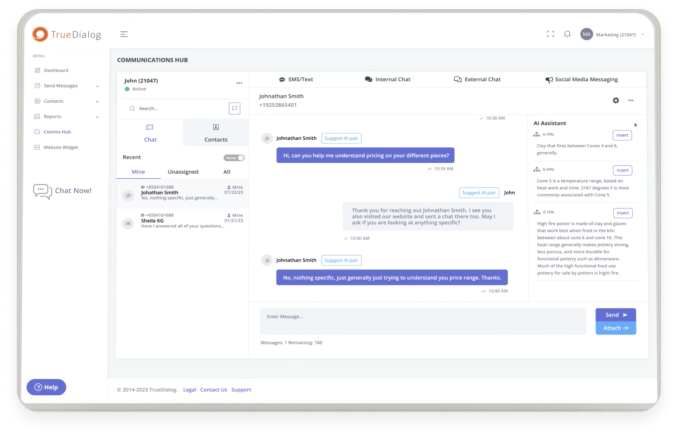

Your marketing and sales teams probably spend a lot of time in Salesforce. Meanwhile, your prospective customers are spending a lot of their time on their mobile phones. Your teams need a way to communicate with customers where they are — ideally on the platform where they do much of their work. Setting up Salesforce CRM (customer relationship management software) text messaging is how you do that.
Salesforce text messaging makes it easier for your employees to send and receive text messaging right in Salesforce, so they can minimize switching between programs. It also lets them manage their SMS conversations alongside customer data, so they can better match the messages they write to the recipient’s situation and history with your organization. That helps sales, marketing, and customer service representatives provide more relevant, helpful information to the people they communicate with.
This article will provide a basic primer on the main things you need to know about Salesforce text messaging, including:
- How sending and receiving text messages through Salesforce works
- Why tracking and storing SMS conversations is important
- Common use cases for Salesforce text messaging
- The value of creating a centralized Salesforce message history
- Common messaging challenges and how to address them
What Is Salesforce CRM Text Messaging?
Salesforce CRM text messaging refers to the ability to send and receive text messages from within Salesforce. To enable Salesforce text messaging, you need to connect an SMS (Short Message Service) platform with Salesforce. Once you’ve done so, your authorized teams should be able to send and receive messages from within Salesforce. And depending on the SMS solution you choose, they may also be able to set up automated SMS flows and see the entire history of a customer’s SMS conversations within the CRM.
Can Salesforce Send and Track Text Messages?
Salesforce can support text messaging through a native or connected SMS solution. In other words, to gain powerful SMS functionality within Salesforce, you want to first choose a mass text messaging platform that offers integration with the CRM, then connect it to your Salesforce instance.
The specific features you’ll gain access to will depend on the SMS platform you choose, but once the two products are integrated, you should be able to associate your sent and received messages with specific leads, contacts, accounts, and opportunities stored in your system. That makes it possible to see the bigger picture of how your text messages fit into the entire customer journey.
Whether or not you can track text messages in Salesforce to see a full message history for each customer also depends on the SMS platform you choose. But with a solution like TrueDialog, all the text messages your teams send and receive will be recorded within Salesforce, allowing reps to see the full context of a person’s relationship with your brand as they communicate with them.
How Text Messages Are Stored in Salesforce
While the particular details of how to store text messages in Salesforce depend on the SMS platform you choose, the basic process looks pretty similar across the board:
- First, a team member sends a message, an automated flow they set up is triggered, or a customer sends a message to the brand.
- The SMS platform will use the recipient’s phone number to match the message(s) with the appropriate Salesforce record.
- The platform will record the message content, timestamp, delivery status, and all replies to the customer’s record in the CRM.
Once the relevant record is updated, all your authorized users will have access to the SMS conversation history inside Salesforce. The exact interface can vary by SMS solution — some log messages as a related list on the record, others use a dedicated messaging tab.

What SMS Information Can Be Tracked?
Again, the specific details you’ll be able track in Salesforce will depend on which SMS software you select, but Salesforce SMS tracking often includes information like:
- The content of your text messages
- The sender and recipient
- Any incoming replies
- Timestamps for when the message was sent and received
- Delivery or failure status
- User or team the message is assigned to in Salesforce
- Any related accounts, contacts, or cases
- Consent and opt-out status
- Conversation history
If you know what specific SMS information you want Salesforce to capture, factor that into your evaluation process when choosing an SMS solution.
How Teams Use Salesforce CRM Text Messaging
Salesforce CRM text messaging adds valuable functionality that marketing, sales, and customer service can all use to make their jobs easier and improve communications with prospects and customers. Each team has some distinct use cases where Salesforce text messaging adds value.
Marketing
30% of people in North America name SMS as their most preferred channel for marketing communications, making it a crucial channel to include in your marketing mix. Salesforce text messaging makes it easy for your team to send marketing messages that support your larger marketing efforts, such as:
- Promotional messages
- Campaign alerts
- Event reminders
- Lead nurturing flows
- Personalized customer updates
Because Salesforce already connects your marketing channels, your SMS messages can be integrated into omnichannel campaigns, while also improving the visibility of marketing conversations across other departments.
Sales
Your sales team also benefits from gaining easier access to a communication channel many leads prefer. When they can send text messages from Salesforce, sales reps can easily use SMS to send:
- Lead follow-up messages
- Meeting reminders
- Quote follow-up messages, which can be automated
- Suggested next steps to move opportunities through the pipeline
A good SMS platform will also allow for one-to-one customer conversations. Your Salesforce text messaging won’t just be limited to outgoing messages, you can use it to manage full conversations with prospects — which marketing and customer service teams will then have access to as well, improving the overall continuity of the customer experience.
Customer Service
37% of consumers now say SMS is their preferred channel for customer service. Salesforce text messaging gives support staff a way to provide fast, informed support responses in the same place where all your customer data lives. From within Salesforce, customer service representatives can send messages like:
Case updates on an open ticket
Appointment changes and reminders
Service notifications, like when a product will temporarily be down or when there’s an update
Maybe most importantly, they can conduct full support conversations with access to a customer’s previous interactions — including interactions that happened in other channels. 59% of consumers consider it important for information to transfer between communication channels, and 66% feel frustrated when they have to repeat themselves during the support process. Salesforce text messaging helps you avoid that.
Why Centralized Message History Matters
While it’s not a feature available with every SMS platform, if you choose the right Salesforce text messaging solution, like TrueDialog your teams can gain access to full SMS conversations within your CRM. And if you also use HubSpot or Microsoft Dynamics alongside Salesforce, TrueDialog’s TrueConnect® extends that same visibility across CRM platforms. Every team sees the same conversation, no matter which CRM sent it.
That’s valuable for a number of reasons, a centralized message history provides:
- Shared visibility across all your teams – Sales can see which marketing messages a prospect responded to, customer support can see the feedback they provided during the sales process, etc. That keeps everyone more informed when interacting with customers.
- Fewer disconnected conversations – You can avoid the dreaded customer experience of having to repeat all the details of an issue with each new interaction.
- Better handoffs between team members – When a conversation is passed on to a new contact, they have all the pertinent information they need right in the CRM.
- Reduced manual note-taking – When messages are all saved automatically, staff don’t have to spend time making a manual record of what customers said.
- Access to previous customer interactions – Every staff member across teams can come into every conversation knowing the relevant details of past customer interactions.
- More complete customer records – Have confidence that all your past text messages with each customer are saved, should you ever need to access them.
Common Salesforce CRM Text Messaging Problems
Depending on the SMS platform you choose, you may experience some issues getting everything set up right — especially if the platform doesn’t offer a native integration with Salesforce. Some common issues to be wary of are:
- Failure to connect sent messages to the correct record in Salesforce
- Not logging every incoming reply (or not logging any at all)
- Dividing conversation history across duplicate contact records
- Not tracking delivery status reliably
- An inability to connect properly to all necessary tools, causing some team messages to be missed in Salesforce
- Overly restrictive user permissions that prevent access to conversations
- A failure to synchronize opt-outs across all relevant tools
- Requiring excessive manual work or additional third-party tools like Zapier to set up workflows
Choosing an SMS platform designed to work seamlessly with Salesforce will address many of the issues and save you a lot of problems down the line.
What to Look for in a Salesforce Text Messaging Solution
Many of the benefits of Salesforce text messaging depend on choosing the right text messaging platform that integrates with the CRM. When evaluating your options, here are some of the most important factors to consider:
- Two-way text messaging – Your teams should be able to have conversations, instead of treating messages like a one-sided broadcast.
- Automatic message logging – Look for a solution that logs both incoming and outgoing messages in Salesforce automatically.
- Association with Salesforce records – You want each text message to be linked to the correct Salesforce record for each account or contact.
- Mass text messaging and one-to-one – Some use cases call for bulk messages (like many marketing communications), while others require one-to-one conversations (like many support issues), look for a solution that enables both.
- Workflow automation – Automation features can save your teams significant time and energy.
- Searchable conversation history – It should be easy to pull up relevant conversations from past interactions with a customer, in order to provide more helpful, informed responses for the current interaction.
- Consent and opt-out management – Effective opt-in and opt-out management is paramount to stay on the right side of the law and maintain user trust.
User roles and permissions – You should be able to control which employees and outside users (like contractors) have access to what data. - Onboarding and support – Any software you invest in has to be adopted by your teams to be useful. A strong onboarding process and helpful support staff can make a big difference to how valuable your SMS platform turns out to be.
How TrueDialog Supports Salesforce CRM Text Messaging
TrueDialog is a business texting platform trusted by over 2,000 customers, with a native integration with Salesforce. That makes getting set up with TrueDialog in Salesforce a fast and easy process. Once you do, you gain valuable features like:
- The ability to send and receive text messages within Salesforce
- Automatic message logging for both sent and received messages
- A centralized conversation history
- The capability for both one-to-one and bulk messaging
- Workflow automation features
- Visibility into delivery status
- Consent and opt-out management
- Access across all your teams to all relevant customer conversations
TrueDialog helps you bring all your SMS interactions into one place — across departments and including the full message history. Get started by setting up your Salesforce integration.
FAQs
Can Salesforce send text messages?
If you connect Salesforce with an SMS platform like TrueDialog, your teams can send and receive text messages from within Salesforce.
Can Salesforce track text messages?
If you want to track text messages in Salesforce, you should look for an SMS platform that offers Salesforce SMS tracking and offers a native integration with CRM, like TrueDialog.
Can incoming SMS replies be logged in Salesforce?
Yes, if you choose an SMS platform that offers this functionality, incoming text messages can be logged automatically in the appropriate Salesforce record.
What if I use Salesforce alongside other CRMs? Can my messages be tracked?
Yes, if you use TrueDialog, which includes TrueConnect, all your inbound and outbound text messages will show up on the matching record in every connecting system, matched by phone number.
Where are text messages stored in Salesforce?
Text messages are stored on the matching Salesforce record — usually the contact, lead, account, opportunity, or case tied to that phone number — alongside the rest of that customer’s history.
Can Salesforce text messages be automated?
Yes. As long as you choose an SMS platform that supports triggered workflows, you can automate messages like appointment reminders, follow-ups, or renewal notices based on Salesforce data and scheduled triggers.
Why are some text messages missing from Salesforce?
Messages typically go missing when the SMS platform can’t match them to the right record — often due to duplicate contacts, disconnected tools, or restrictive user permissions.