
Whether you’re a fledgling business starting out in your garage or a big name in tech with Silicon Valley streets named after you, what is a crucial element to your success? Low prices? High quality? A fancy website and social media influencers touting your product or service? The true key to a thriving business is a marketing strategy that reaches customers where they actually are.
Even if you have the best offering on the market and a recognizable brand, without marketing your business will hit a limit. Marketing strategy evolves as your business and brand do, and a good marketing approach takes into account the current times.
A decade ago you wouldn’t have thought of sending text messages to prospective and current clients. In this era, you shouldn’t risk not sending them. SMS meets consumers where they’re available – and want to be met – and accelerates your efforts to establish brand value and recognition. We’ll show you how to set up text alerts for your business so you can start reaching more customers.
What You’ll Learn
- What business text alerts are and how they work
- How to build a compliant subscriber list
- The best use cases for text alerts across industries
- How to choose the right SMS platform for your business
What Are Business Text Alerts?
With the popularity of SMS amongst businesses, chances are you’ve received at least one yourself. Text alerts for businesses deliver messages swiftly, reliably and are particularly valuable for time-sensitive information.
According to Mailchimp, emails have an average open rate of 21% across industries surveyed. Think that’s pretty good? Compare that to 98% for SMS, and you’ll see who comes out on top. Email marketing can serve a purpose but for reliable delivery of messages, texting is the best approach.
Sending text alerts not only builds brand recognition but adds value to your relationship with your customers. Sending alerts to pass urgent information, reminders, confirmation, and more help you move away from simply facilitating transactions. Adding value helps you retain customers and increase sales.
Related: How to Use Enterprise Text Messaging Software (with Tips)
How to Set Up Text Alerts for Your Business
It’s not difficult to learn how to set up text alerts for your business. In fact, the best SMS platforms are so intuitive that the process can take just minutes. Depending on the purpose of the alert, you may schedule them in advance or set up triggers to automate messages. Weaving text alerts into your marketing strategy means you can align your messages with your overall business objectives. We’ll explore some ways to use text alerts in the next section, but let’s start with some basics on how to set them up so you’re ready to go:
Build a Subscriber List
Casting a wide net is a great strategy, but unfortunately, you can’t just text whoever you want. You can, but they need to subscribe to hear from you first. The Telephone Consumer Protection Act (TCPA) requires businesses to obtain explicit consent before sending automated text messages — so building a permission-based subscriber list isn’t just good practice, it’s the law. To save yourself the hassle and stay on your current and prospective customers’ good list, make sure you obtain consent.
Once you have a short code or 10DLC for your business, start sharing it. You can include it in email marketing messages, add it to your website, reference it on print materials, and even have a QR code in your store or office that can easily initiate an opt-in. To be legally compliant, you’ll need proof of consent, so make sure you get one.
Choose An Easy Opt-In
The best way to ensure your success in gaining subscribers is to make it easy for them to opt in. When you share your short code with others, give them clear instructions. For example, “Text SIGNUP to 12345”. Making it quick and painless will work in your favor.
You’ll also need to provide a clear and easy opt-out path — a requirement under the TCPA. When it’s time to send messages, remember to make it clear how your subscribers can stop receiving messages (though we’ll give you some tips on how to add so much value that they’ll like to hear from you!)
Use a Comprehensive SMS Platform
As we said, setting up text alerts for your business is simple. Yes, sending business SMS may be as easy as sending a shopping list to your partner, but it’s not done in the same way. Professional text messages require a professional platform.
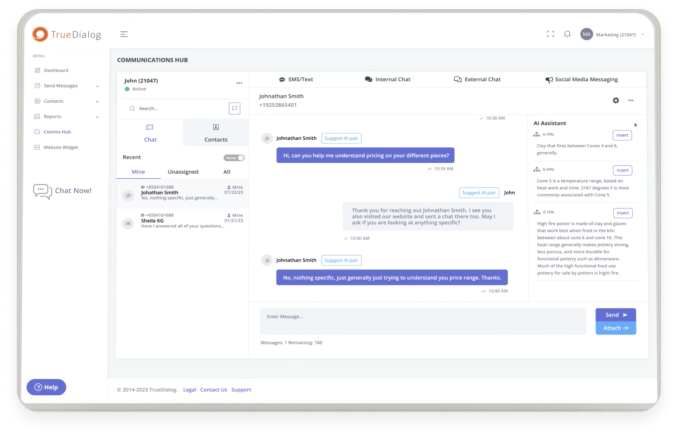
A business SMS platform will allow you to craft and distribute messages with ease. With integrations into your CRM system, you’ll be able to track conversations and share across departments, too. Want to schedule messages or set events that will trigger an SMS? You can do it all easily from a centralized point.
Now that you’ve got the foundation in place, here’s how businesses across industries are putting text alerts to work.
What Can Business Text Alerts Be Used For?
Once you have subscribers and have chosen your platform, it’s time to get business SMS working for you. There are many ways you can use text alerts for business to benefit your communications with employees, or externally to grow your business and add value for your customers.
Marketing and Outreach
Text alerts are key to marketing strategy. Once a current or prospective customer subscribes, you can use text alerts in a variety of ways to keep your brand front of mind and to build a relationship.
Send exclusive offers, mobile coupons, product announcements, or invitations to events or launches. Hold a text-to-win contest where recipients participate by replying to your message or supplying information. Solicit feedback after a purchase or testimonials for your website.
To be most effective, messages should be short and to the point with a clear call to action.
Related: Salesforce SMS Text Messaging Integration
Confirmations and Reminders
A valuable use for text alerts for business is confirmations and reminders. These polite nudges not only help your customers remember appointments or due dates, but they also help save you from endless follow-ups or lost time due to no-shows.
Text alerts can send a message a couple of days before a booked appointment as a reminder, offering an opportunity to reschedule if needed. You can also set up alerts for service reminders, subscription expiry, or the end of a warranty period.
If your business receives online applications or digitally submitted information or documents, you can use text alerts to confirm receipt. Text alerts can also provide updates on order status: receipt, dispatch of a package, and tracking information.
Schools and Higher Ed
Schools and higher education institutions can use text alerts for business, too. Send alerts throughout the recruitment process to provide information and schedule tours. Update about application statuses and deadlines for submissions and financial aid payments. Extend invitations to campus events.
SMS also proves invaluable when plans shift — alerting students to campus closures, schedule changes, and online access to the courses, events, and services they need.
Urgent Alerts
Sometimes there are alerts that are highly time-sensitive, and you need to get them to their recipient quickly. Urgent alerts are a great use for text alerts for business, as they’ll distribute information quickly to those who need to receive it.
Whether it’s a power outage, inclement weather, a major road traffic incident nearby, or a security issue, urgent alerts will easily and reliably get the word out. TrueDialog’s Urgent Alert System sends mass simultaneous SMS and voice alerts in a single click — useful when a message must reach everyone in seconds.
Employee Alerts and Updates
Not limited to customers and external communications, setting up text alerts for your business can also help you communicate with your employees. If you have an IT issue, power outage, event announcement or updates, or another message to distribute to employees, send an SMS. Emails get buried and making individual phone calls is unreasonable.
With integration into third-party systems, you can create segments from your employee list. Send messages to a single department, location, or company-wide with ease.
Healthcare and Patient Communications
Text alerts are a natural fit for healthcare providers. Appointment reminders and confirmations, prescription refill notifications, billing notifications, and post-visit follow-ups keep patients informed and reduce no-shows — without relying on phone tag or emails that go unread.
Healthcare messaging does come with added responsibility: protected health information (PHI) should stay out of message bodies, so point patients to a secure portal for anything sensitive. Look for a platform with HIPAA-aligned messaging policies, opt-in management, and detailed audit trails — and remember that your organization remains responsible for its own HIPAA compliance program. TrueDialog supports HIPAA-aligned secure messaging for healthcare organizations, with opt-out management housed in an ISO-certified cloud data center.
Why SMS Is the Most Effective Channel for Business Alerts
SMS is the most effective and reliable way to reach customers in this era. According to Pew Research, 98% of Americans own a cell phone — and most say they’re rarely without it. Customers would rather lose their wallet than their phone, and for good reason: our phones do it all, including making payments.
SMS alerts add value and build credibility for your brand. Proactive messages, enticing offers, follow-ups, and more keep you in contact with your customers. TrueDialog makes it simple to craft and send messages at scale — one reason it scores 9.5/10 on G2 for ease of setup. With native integrations for Salesforce, HubSpot, and Microsoft Dynamics 365 — plus social messaging managed from the same centralized inbox — you can ensure continuity in messaging and approaches to your marketing strategy.
Contact us to learn more about how to set up text alerts for your business, or schedule a demo.