As a marketer, you’ve probably heard the old saying, “you can’t manage what you don’t measure.”
And while there are countless trite platitudes tossed around the business world, this one is absolutely true — especially when it comes to your SMS program. After all, if you aren’t carefully tracking performance and measuring results, how do you know whether your efforts are worth the resources you invest?
SMS tracking is an essential component of a successful text messaging strategy, and today we’re breaking down how it works, what to measure, and tips to help you and your team make more data-driven decisions.
SMS Tracking vs. Text Message Tracking: What It Means in Business Messaging
Before we dive in further, it’s important to note that SMS tracking differs from text message tracking. While you may often see these two terms used interchangeably, they often refer to different things (especially in an enterprise messaging environment).
- SMS tracking refers to technical, carrier-level data for standard SMS messaging (such as send status, delivery receipts, carrier filtering signals, error codes, opt-outs, and throughput). Your SMS marketing platform uses this data to confirm whether a message reached the carrier and was delivered to the device, or failed due to compliance issues, network restrictions, or an invalid number.
- Text message tracking is an umbrella term that encompasses not only SMS tracking, but also engagement and campaign analytics across multiple channels (including RCS). This may include metrics like link clicks, replies, read receipts, performance by segment, and automation outcomes.
In other words, while SMS tracking primarily focuses on messaging infrastructure and delivery, text message tracking provides additional insights into audience behavior and campaign-level data. SMS tracking answers the question, “Did my text message reach my audience?” while text message tracking can also tell you what happened after a message arrived. It’s wise for your brand to leverage both.

What Is an SMS Tracker?
An SMS tracker is the software or reporting tool organizations use to gather information about SMS message delivery, including everything that happens between when you launch a campaign from your enterprise SMS solution and when it appears on recipients’ devices.
Instead of sending texts simply and hoping for the best, an SMS tracker collects data (often in real time) and shares send statuses, delivery confirmations, and message failures (and error codes to help you understand why a message failed). It can also tell you whether contacts opted out and your message throughput (i.e., how many messages are transmitted each second).
In most cases, your mass texting platform will translate this raw carrier data into easily digestible analytics via graphs and dashboards. With better data visualization, teams can quickly identify problems and fix them. For example, if you discover a message failed because you accidentally included verbiage the carrier considers spam, you can stop the campaign, revise the message content, and restart it.
(Of course, with TrueDialog’s TrueDelivery® feature, you’ll know the likelihood of delivery before you press send. This way, you can edit your message content instead of risking carrier flagging and filtering.)
How SMS Delivery Tracking Works (From Send to Handset)
Now that you know what SMS trackers are and why they’re important, the next logical question is, “How do you know if a text went through?”
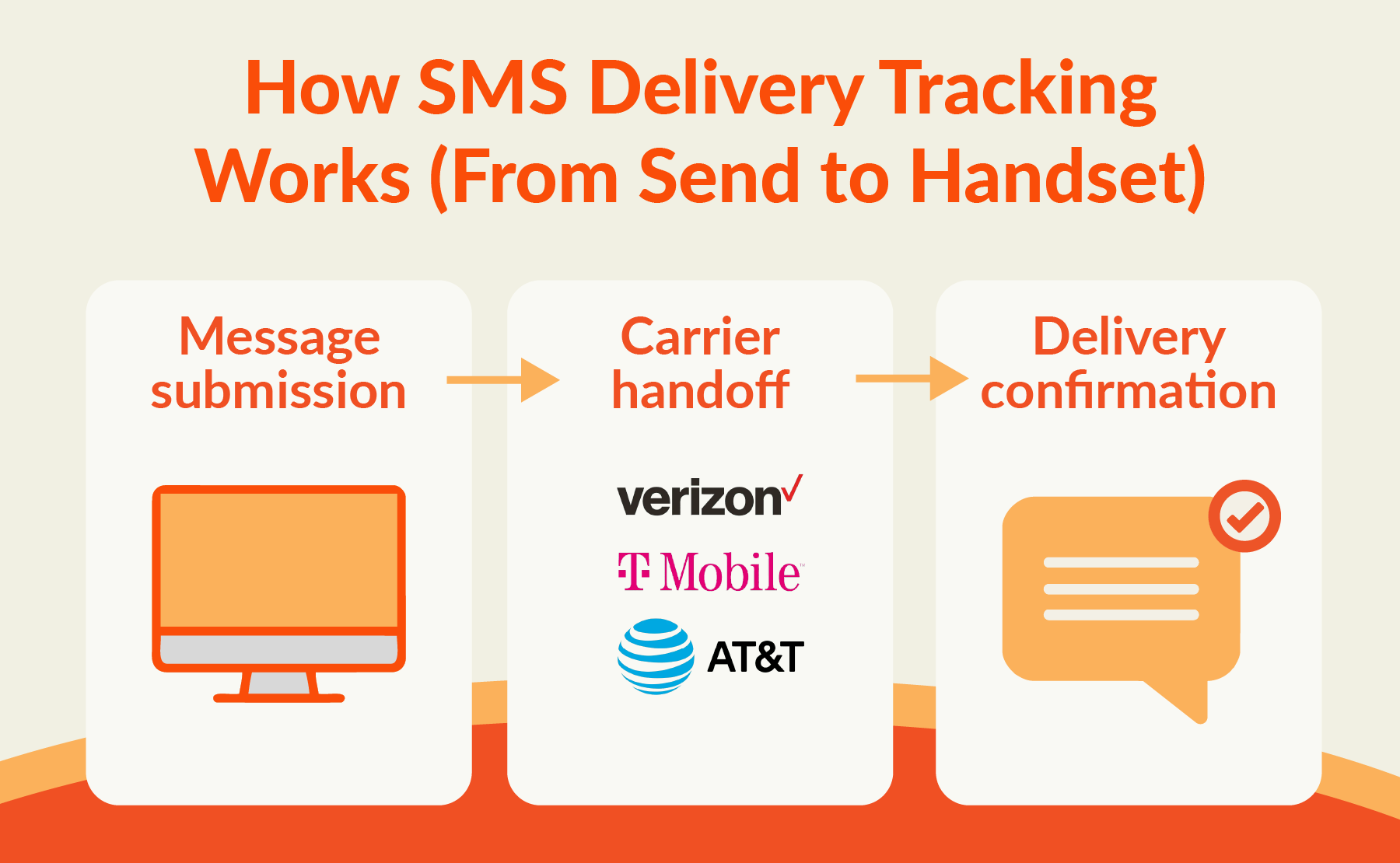
Fortunately, SMS tracking collects status updates at multiple points on a message’s journey to your recipients’ devices:
-
-
Message submission
When you use an SMS platform, the system assigns a unique ID to each message so it can log key details (such as the sender, recipient number, and timestamps).
-
Carrier handoff
After the message leaves your platform, it travels to mobile carriers, which accept, queue, deliver, or reject it. Carriers will send status signals known as delivery receipts (DLRs) indicating whether a message was delivered, failed, or filtered.
-
Delivery confirmation
Once a message reaches its recipient, your platform will record it as delivered. However, if something goes wrong (such as carrier filtering or an invalid number), the system will log a failure code. These codes provide teams with more context about the issue so they can troubleshoot quickly.
-
How to Know If a Text Was Delivered
After spending countless hours preparing a strategy, crafting copy, setting up your campaign, and pressing send, the first question most marketers have is, “How do I know if a text message was delivered?”
As mentioned above, SMS tracks every step of the journey to ensure you know whether your messages reached their intended destination.
For businesses, text message delivery is usually confirmed via delivery receipts sent back to SMS platforms as soon as messages reach recipients’ devices. Marketing teams can usually see these status signals in messaging logs or reports on their mass texting platform. (TrueDialog users can find these details on their dashboards under “Campaign Activity.”)
SMS Delivery Receipts: What’s Possible and What Isn’t
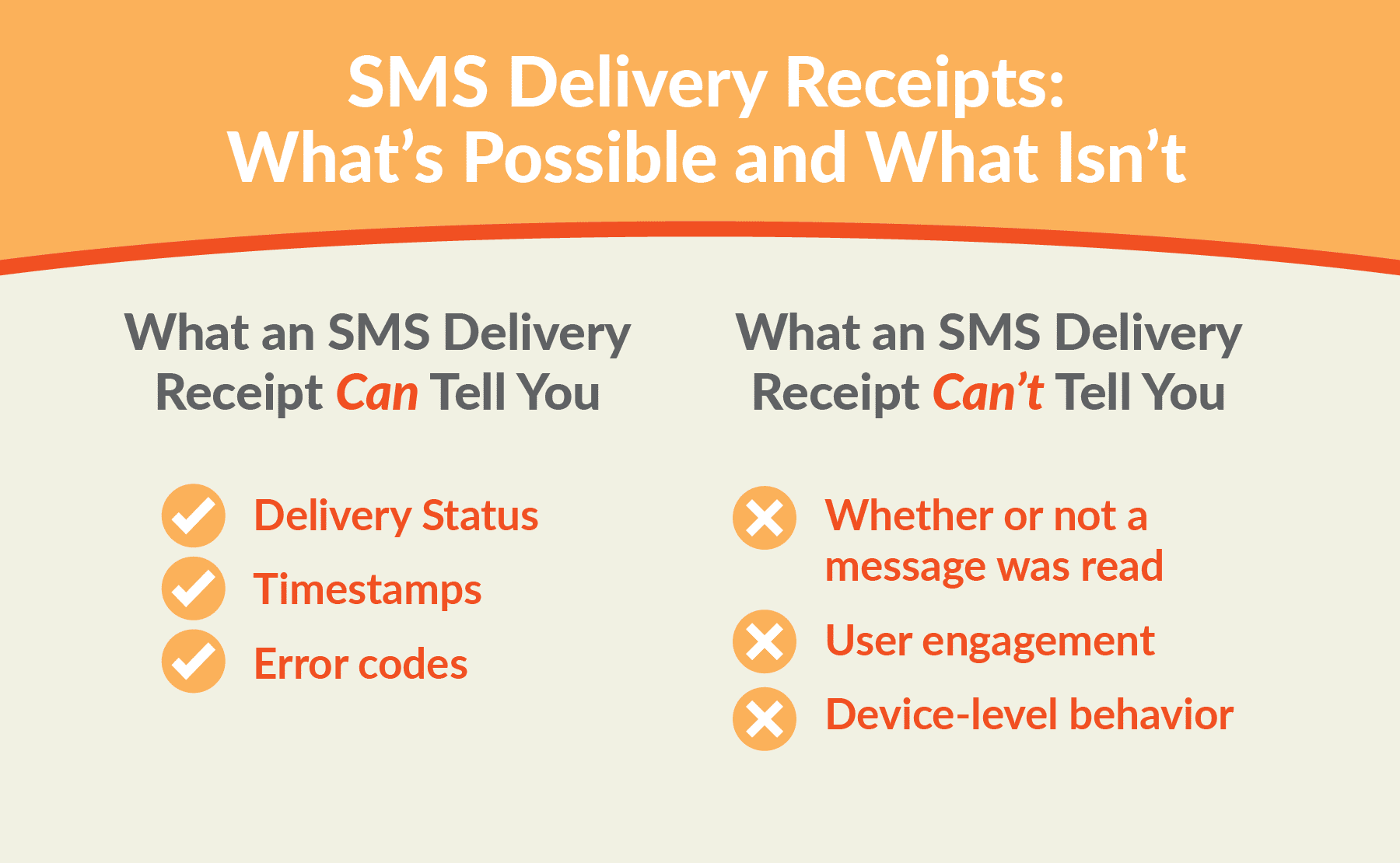
So what information, exactly, can and can’t an SMS delivery receipt tell you?
What an SMS Delivery Receipt Can Tell You
Delivery Status
This will tell you whether the message reached the carrier network and was accepted, delivered, rejected, failed, or expired. (I.e., Whether the message actually reached the carrier and your recipient’s device.)
Timestamps
DLRs usually also include timing details (i.e., when the carrier received the message or confirmed delivery).
Error codes
If your message fails to deliver, the carrier will provide an error code. These codes will tell you more about the issue (such as whether you attempted to text an inactive or invalid number, whether the message was rejected by the carrier or blocked as spam, or whether a network issue prevented the message from reaching the recipient).
What an SMS Delivery Receipt Can’t Tell You
Whether or not a message was read
Unfortunately, there’s no such thing as an SMS read receipt, so DLRs won’t tell you whether contacts opened and viewed your messages. (However, some text tracking can give you these details, and RCS also supports read receipts.)
User engagement
SMS delivery receipts won’t show clicks, conversions, replies, or sentiment. To gain more insights into engagement, you’ll need to use link tracking, reply monitoring, or analytics tools (which may be available through your enterprise SMS platform).
Device-level behavior
Basic DLRs also cannot show you what happened once the message reached your contact’s device. For example, it can’t determine whether a recipient’s notifications were silenced, whether the message was displayed as a preview, or if your contact deleted the message.
Common SMS Delivery Errors and How to Fix Them

Of course, as any marketer managing text messaging campaigns can attest, even the most well-planned, carefully crafted messaging can occasionally encounter delivery issues. Fortunately, proper tracking helps you and your team identify and troubleshoot those issues faster.
Here are a few SMS delivery errors you may encounter, and how to avoid them:
Non-mobile or invalid numbers
If you get this error, it usually means you accidentally sent messages to numbers that can’t receive SMS messages (such as landlines), or the number was entered incorrectly.
The best way to prevent this from happening is to use a number validation tool. For example, TrueDialog offers a carrier lookup feature that identifies whether a number is mobile or landline, so you can avoid wasting time and budget sending to numbers that can’t receive your messages.
Carrier filtering and blocked content
Mobile carriers actively monitor text messaging content from brands to help curb spam, scams, and non-compliant practices. And if your messages contain suspicious wording, excessive capitalization, or other “red flags,” they may be erroneously flagged as spam.
Fortunately, TrueDialog’s TrueDelivery® feature helps you identify content that could trigger spam filters before you press send, reducing the risk of messages being filtered or blocked.
Rate limits and sending too fast
In some cases, sending a high volume of messages too quickly can exceed carrier throughput limits, leading to delays and temporary blocking.
The good news is that enterprise mass texting platforms usually have built-in features to help avoid exceeding carrier limits. Additionally, TrueDialog has proprietary direct carrier connections that eliminate the need for intermediaries (such as third-party CPaaS solutions) and help ensure higher throughput and more reliable delivery.
Opt-in and compliance-related failures
Sending messages without proper consent from your recipients, or messaging users who have opted out, violates industry regulations and carrier rules and can result in your messages being rejected or even blocked.
The best way to avoid this issue is to follow good compliance practices, such as maintaining clear opt-in workflows and consent logs, and ensuring your system automatically stops messaging contacts if they opt out. TrueDialog offers a range of built-in SMS compliance features to help you protect your business from regulatory violations.
SMS Tracking Best Practices for Better Reporting
We’ve spent a lot of time covering delivery receipts, and for a good reason. Delivery is, arguably, one of the most important metrics you can monitor — and if your messages can’t be delivered, you can’t accomplish your other goals. That said, in addition to monitoring delivery receipts and error codes, there are other best practices brands should follow to help ensure more useful reporting and actionable insights:
-
Align tracking metrics with specific campaign goals
Remember that SMS tracking can only tell you whether your text was delivered, when it was delivered, and if it encountered any errors — but enterprise SMS solutions can tell you much more. Before you launch any campaign, decide what success looks like beyond delivery and which metric will best assess performance.
For example, to determine the success of a reminder text campaign, you might opt to track replies and link clicks.
-
Use trackable links
Alongside basic SMS tracking, you can also use trackable URLs to measure how many recipients engage with the content you share. TrueDialog even offers a proprietary link shortener with an option for custom, branded links (which often enjoy better delivery rates and inspire more audience trust than those from generic link shorteners).
-
Segment reporting by audience and message type
Keep in mind that different audiences behave differently, and dividing your contacts by relevant criteria can help determine what resonates most with each group. Then, you can optimize future campaigns and messaging content for even better results.
-
Share data across systems and teams
In some cases, you may have several teams or departments sending texts to your audience. For example, customer service teams may use texting to offer real-time support, and sales pros may use SMS to engage directly with their leads. Make sure you share performance data with everyone who uses texting so they also have an opportunity to learn and optimize.
(This is also why it’s helpful to leverage an enterprise SMS solution like TrueDialog that natively integrates with leading CRMs and marketing automation platforms, ensuring up-to-date data is accessible across departments.)
FAQs
-
What is SMS tracking, and what can it actually measure?
SMS tracking is the process of monitoring what happens to your messages after you press “send.” With standard carrier-level tracking, you can get insights into your messages’ delivery status, timestamps, and error codes. (Beyond SMS tracking, mass texting platforms like TrueDialog can also gather engagement data such as link clicks, opens, replies, and more.)
-
How do I know if a text message was delivered or failed?
If a text message cannot be delivered, the carrier will usually provide an error code to indicate why the message failed. (For example, a message might have failed because you attempted to send to a number that cannot receive SMS messages, the carrier detected spam, or there was a network issue.) Additionally, the SMS tracking software in your enterprise texting platform will also tell you whether your message was delivered, sent, or failed.
-
Are SMS read receipts possible, and what are the best alternatives?
While traditional SMS does not support read receipts, you can use other metrics to determine whether a recipient interacted with your message content. For example, include trackable links or use a solution like TrueDialog that can track opens and click-throughs.
Interested in learning more about tracking and measuring campaign performance with TrueDialog? Request your demo today.