TrueDialog’s Carrier Lookup feature identifies which numbers are mobile and which are landlines, ensuring your messages reach the right devices. Improve deliverability, compliance, and targeting with accurate number validation.
SMS Contact Management for Smarter Targeting
Keep Your Contact Lists Organized and Actionable
Our SMS contact management features help you organize, segment, and target your audience for smarter messaging. Easily import contacts, track interactions, manage opt-ins/opt-outs, and ensure compliance—all in one centralized platform designed to scale with your communication needs.
It All Starts with Your Lists
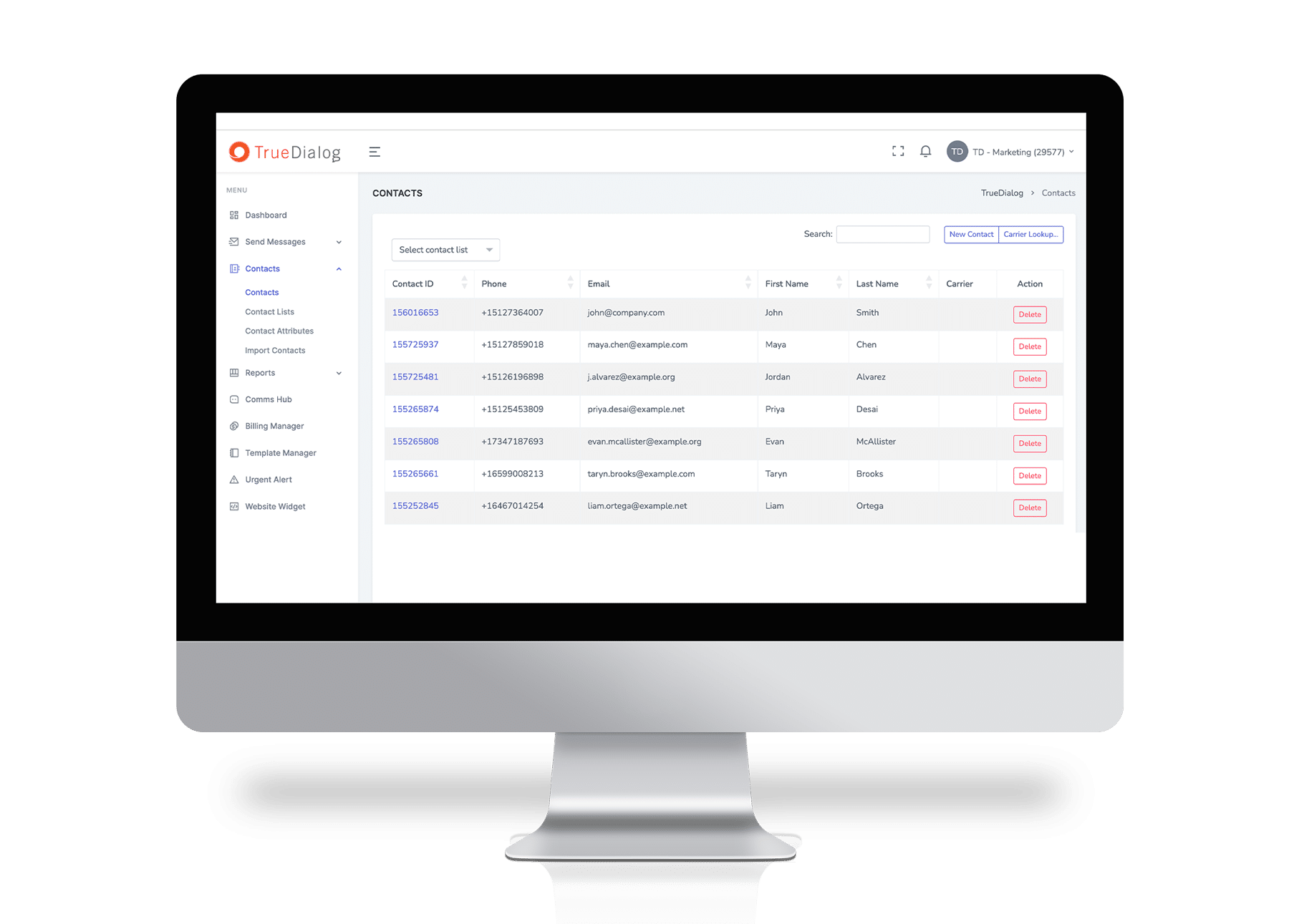
Effortlessly find and manage contacts and cell phone numbers with contact list uploads and real-time CRM syncs. Organize contacts with custom attributes for personalized campaigns using static and dynamic lists. Create, edit, and sync lists across platforms to ensure accurate targeting, streamlined outreach, and improved engagement at every step.
Create, edit, and manage contact lists, ensuring precise audience segmentation for your campaigns. No need to create a new list with each campaign – unless you want to. Using our dynamic lists, deliver personalized, high-impact messages to the right customers at the right time.
With TrueDialog, import contact data from external sources, ensuring a smooth and efficient integration with your messaging system. Using our auto field mapping, pick and choose the fields you want to import and our smart matching feature does the rest, including removing duplicates, providing an audit log with error codes, and phone number formatting for consistently high deliverability.
Define and store custom attributes for each contact, enabling highly personalized and targeted communication. Leverage customer data to tailor messages, improve engagement, and enhance customer interactions.
Our Contact Database keeps all your customer information organized, enabling efficient campaign targeting. Store, manage, and segment contacts for personalized messaging, improved engagement, and streamlined communication.
Ensure SMS compliance with single or double opt-in methods—protect your brand and respect user consent. Stay compliant with manual and opt-out by keyword.
In addition to contact attributes and activity history, set multiple subscription types to easily create and segment users.
Frequently Asked Questions
SMS Contact Management
SMS contact management is a system for organizing, editing, segmenting, and maintaining your audience so you can send highly tailored, relevant messages to the right recipients at the right time. Depending on the enterprise texting platform you choose, you’ll also have access to additional features that keep your lists clean, updated, and compliant with carrier policies and industry regulations.
For example, TrueDialog offers features such as dynamic lists that enable precise segmentation for every campaign, multiple opt-in and opt-out methods to ensure you only message contacts who’ve given their consent, and carrier lookups to help ensure you’re only texting real mobile numbers (and not wasting money sending messages to landlines).
Dynamic contact management automatically updates contact lists based on preset rules and criteria, making it easier to send highly relevant campaigns.
For example, with TrueDialog, you can effortlessly create lists of contacts based on demographic attributes (such as everyone in a specific geographic location, or those with a particular job role) or behavioral attributes (such as everyone who clicked a link, made a purchase, or attended an event).
This way, you don’t have to recreate a new list each time you want to send a campaign to a specific segment of your audience — you can simply choose from an existing list that’s been automatically updated with new contacts.
Yes! With TrueDialog, you can import contacts from external sources, such as your CRM, marketing automation platform, or a spreadsheet. Our platform also includes an auto-field-mapping feature that makes it easy to import exactly the data you want (in the format you want) without creating duplicates.
(However, keep in mind that even if you have a contact’s phone number, you still have to obtain explicit consent before you text them.)
The TrueDialog platform includes several automations to help simplify and streamline contact management. But if you need to edit a contact manually, it’s easy to do that too. Just search for the contact you need to edit, click on the record, and (so long as your admin has given you permission to do so) edit the attributes you need to change.
This can come in handy if, for example, a contact shares new contact details or requests to opt out of your SMS program during a phone call (rather than via text). Just keep in mind that you’ll also need to update this data in your CRM. (Of course, if your CRM is integrated with TrueDialog, any contact details you update in the CRM will sync back to TrueDialog.)
Keeping your contact lists organized and up to date is vital for regulatory compliance, and TrueDialog’s contact management features help you do just that.
Our platform is built with enterprise-grade security to help protect data privacy, carefully stores records of account activity (including opt-outs), and provides user-friendly platform administration to ensure only authorized individuals can view or edit contact information. Additionally, the platform offers single- and double-opt-in methods to make sure you don’t message contacts who haven’t given verifiable consent.
When you use a single opt-in method, your contacts submit their contact details, consent to receiving texts, and are immediately added to your audience. But with double opt-in, there’s an additional verification process in which your contact is asked to confirm their signup in the first text you send. This additional step helps you ensure you have the correct number, can satisfy extra-stringent regulations, and can avoid texting someone who signed up by accident or is a victim of a fake signup.
Related
Resources
Our native apps make your experience seamless.
Learn More